Tag: business

  • What should we call the sharing economy

    What should we call the sharing economy

    Stop calling it the sharing economy, cries marketer Olivier Blanchard in a blog post describing how the label is inappropriate and doesn’t accurately describe the imbalances in the relationships between providers, users and the online platforms that facilitate them.

    The question is what do we call the business model of companies like Uber, AirBnB and the myriad other services that take providers’ time and resources – cars in the case of Uber, homes or spare rooms for AirBnB – then make them available to people who can use them, taking a commission in the process of course.

    Blanchard wonders if much of the success of these companies is because America’s cash strapped middle classes are desperately trying to find additional source of income and there is very much a strong argument for that.

    More importantly, is what do we actually call these businesses? While they are potentially are as exploitative as the free labour models that have evolved in the media with businesses like Huffington Post, at least they provide some type of income even if for Uber drivers the net returns may be marginal at best.

    Blanchard himself suggests the Microtransaction Economy however that’s not a satisfactory label as the transactions – which may be many thousands of dollars for some AirBnB rentals – are not always small.

    Maybe we should call it the downtime economy, where we’re using the time we’re not busy or when we’re not using our homes, cars or others assets to earn income. That too though doesn’t strike me as satisfactory although it does seem to address the underlying idea these services are really only intended to supplement somebody’s earnings, not be their primary livelihood.

    None of these labels though are satisfactory and maybe we have to ditch the economy moniker. It’s time to start thinking about what we really should call these businesses.

    Your thoughts.

    Similar posts:

  • Businesses and the Windows 10 upgrade

    Businesses and the Windows 10 upgrade

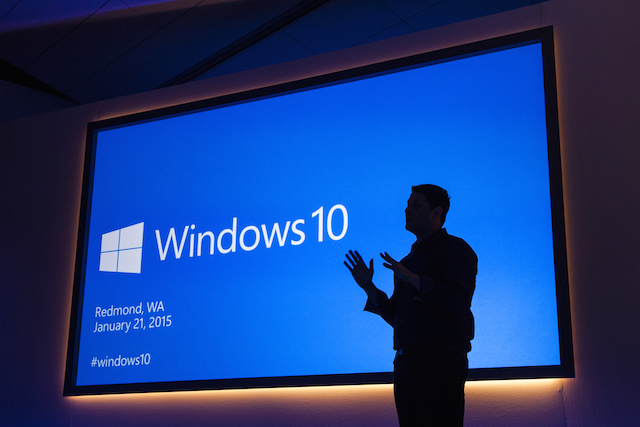
    Last night Microsoft formally launched Windows 10, the company’s latest desktop operating system.

    A decade ago a new Microsoft operating system would have had people queuing at computer shops all night but today, in a world of cloud computing, what software runs on a computer has become less important to users.

    To entice users onto the new operating system, Microsoft are making the upgrade to Windows 10 free for the next year to those using the earlier versions 8 and 7 and many will have noticed the messages appearing on their computers over the past few weeks.

    Windows 10 is a good system, Microsoft has learned from the user unfriendly missteps of Windows 8 and added features that make the system smoother and takes advantage of the desktop computers’ power.

    Microsoft have also continued with their philosophy of providing a system that works on all sizes of devices from smartphones to large monitor PCs and Windows 10 adapts to the needs and use patterns of the different screens.

    That Windows 10 works on smartphones is less of a pressing matter given Microsoft’s attempts to crack the mobile market have been unsuccessfully and Windows phones languish with a tiny market share.

    For business users, the question is whether to take advantage of the upgrade. The short answer is maybe if use cloud based services in your company and wait if you have desktop applications that rely on Windows.

    Should you have applications that run on desktops and servers in your office then it’s essential to wait and see if your software runs properly on Windows 10. You’ll need to talk to the program’s supplier and your IT support person. Generally the advice is to wait a few months to iron out any bugs.

    If you’re using cloud services then the operating system running on your computer is largely irrelevant as long as you have a modern web browser. Microsoft’s new Edge web browser that’s built into Windows 10 so far appears to be a fast and capable piece of software that’s an improvement on the much maligned Internet Explorer that still lurks on the system for backwards compatibly reasons.

    Upgrading though isn’t without its risks, sometimes things go wrong and even the best planned transition doesn’t always work out and generally most cautious IT advisors will take the attitude “if it ain’t broke, don’t fix it.”

    One other potential trap is in hardware. It may be that some printers, cameras and other hardware doesn’t have the right drivers for the new system so while the software upgrade is free, you may end up having to stump up a few hundred dollars for new peripherals.

    For businesses users, if things ain’t broke and the existing computers are working well then the upgrade to Windows 10 is adding unnecessary complexity to the office and it’s probably best to hold off the transition until new computers are needed.

    Similar posts:

  • Management embraces M2M tech

    Management embraces M2M tech

    Companies are increasingly embracing machine to machine technologies, the 2015 Vodafone M2M Barometer reports.

    Interviewing  over 650 executives across 16 countries and seven industries, Vodafone’s report looks at how companies are using M2M technologies in their organisations.

    The most enthusiastic industry adopting M2M is the energy and utilities sector with 37% of respondents claiming they’ve implemented machine to machine projects followed by the automobile and retail sectors.

    Slightly behind the leading three sectors is the consumer industry and we can expect to see that grow as wearable technologies become more common and more household devices come with connectivity built in.

    Globally, the Asian region is driving M2M adoption with governments in China, South Korea and Singapore in particular driving the market growth as they mandate more connected technologies.

    Vodafone concludes the report by stating the question for businesses is not whether to adopt M2M, but how best the technologies can be used to drive business. As organisations find new ways to gather data and apply the insights they find from that information, the business case for adopting machine to machine technologies will get stronger.

    Similar posts:

  • How long can Intel continue to beat the street?

    How long can Intel continue to beat the street?

    Earlier today chip maker Intel beat analysts’ estimates with an earnings report showing  the company’s income hadn’t fallen as much as expected in the previous quarter.

    As Business Insider explained before the earnings call, Intel’s numbers aren’t look good ahead of the rollout of Windows 10.

    In the past, a new version of Windows has been the time many customers upgraded their PCs with Intel and other computer component makers being the beneficiaries.

    With this version of Windows Microsoft are giving it away free to users of Windows 7 and 8 which means the rush of upgrading customers is going to be subdued compared to previous occasions.

    For Intel, the Internet of Things should be the big opportunity in the post PC world but smart devices require low powered chips rather than the more power hungry chips the company excelled in supplying for desktop computers.

    At the moment Intel seems to be focusing on the data centre market that may well be a suitable market for power hungry CPUs but is still very much leaving the company isolated from the bulk of the industry which will increasingly demand ultra low powered chips.

    For Intel, like Microsoft, the struggle for now is to keep relevant in a dramatically shifted marketplace.

    Similar posts:

  • Five basic software tools for a new business

    Five basic software tools for a new business

    Last week I was asked by someone considering starting a business what I’d recommend in the way of software for a new company.

    That’s a good question as cloud services have completely changed what a business should buy over the past five years when the answer back then would have been to buy a new PC with Microsoft Office preloaded along with a boxed accounting package.

    More importantly for a cash strapped business, whether it’s a tech startup or a more conventional business, today’s cloud based tools don’t need new computers and most have free versions that suffice for those early days before a venture has established a cash flow or its viability. That radically changes the economics of setting up a new business.

    Google Docs

    This is the basic essential tool for a new business giving a basic word processing, spreadsheet and presentation package. The free version of Google Docs is technically only available to educational or home users, but then you are running your new business from home aren’t you?

    Paid versions of Google Apps are either five dollars or ten dollars per user per month depending on the features or storage you want. Again for most small business the cheaper version will usually suffice.

    For power users, Microsoft Office is often unavoidable as the spreadsheet and wordprocessing features of Excel and Word are far more extensive than Google’s.

    Email and calendar functions

    Once upon a time your choice of email tool mattered, today it doesn’t as there’s no shortage of free cloud based tools or, if you’re a Mac user, Apple Mail. For most small businesses it’s easiest just to choose Google’s Gmail or Microsoft’s Outlook.com. If you’ve chosen Microsoft’s Office 365 package than Outlook is part of the business bundle.

    Also in the past having an online, shareable calendar was a nice to have but often expensive feature that required a server. Now almost all systems come standards with calendars although Google has the edge in terms of sharing calendars between workgroups.

    Storage

    Being able to store and share files into the cloud has been a boon for small businesses which in the past needed to have an expensive and clumsy inhouse server if they want to share information or even just to access it on the road.

    Microsoft give unlimited storage for Office 365 subscribers while Google offer 15Gb for the free Docs service, 30Gb for the $5 Apps Plan and unlimited space for the $10 Apps plan if you have more than five users. Apple’s pricing is more complex with five different tiers although iCloud is a much more elegant solution for backing up iOS and OS X devices.

    Two third party storage providers such as Box and Dropbox are also worth considering with both offering advanced tools and integration with other cloud services. Dropbox offers a free version with 2Gb of data, a Pro version including a Terabyte of space and a business version that is unlimited at $17 per month.

    Accounting

    One of the biggest mistakes a new business makes is skimping on accounting software. This is one of those areas where cutting corners early can be expensive later. The most popular cloud accounting service for small business is Xero which does a great job in integrating with other online platforms including Office 365 and Google Apps for $25 a month.

    Xero though is not alone in this field with MYOB, Reckon, Quicken and others fighting for marketshare. It’s best to talk to your accountant and find what they work with as this will save problems when you come to do your books.

    Website

    Every business needs a web presence. If your new company is a local service, retail or hospitality outlet then you have to be listed on Google My Business which literally puts your company on the map. Listings on Facebook and signing up with all the main social media services is a must do as well.

    The cornerstone though of an online presence though is a website and the easiest, quickest and no-cost way is to set up a website on Google’s Blogger platform. Once your business gets up and running then having your own web server running WordPress is the best long term solution but in those early days Blogger will suffice and the upgrade path between the two is surprisingly painless.

    Every business though is unique and your business might need more than these five basic tools. If you’re in hospitality and retail you’ll need a Point of Sale solution while if you’re a tech startup products like Slack and Basecamp may be needed as well.

    The five basics though are common to all businesses regardless of the industries they’re in and regardless of the aspirations of the owners. The fact you can set up a business for almost nothing is one of the reasons why it’s worth giving it a go.

    Similar posts: